Step-by-step guide
Follow the current in-game labels.
- 1
Go to the Grocery
Find the in-world Grocery and use its visible Buy interaction.
What to expectThe Grocery purchase list opens.
- 2
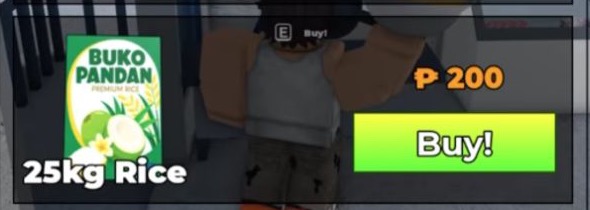
Find the rice entry
Locate the row labeled 25kg Rice in the Grocery list.
What to expectIn gameplay published August 22, 2026, the Grocery list shows 25kg Rice for ₱200 with a green Buy button.
- 3
Use the row's Buy button
Select the green Buy button only after checking the current label and price.
What to expectAfter selecting Buy, use the message or inventory state shown by your current game; a rice-specific confirmation is not documented here.
Rice purchase example
See the Grocery row.